
Help Center
Ask Questions. Browse Articles. Find Answers.
How do I send a Note to another user?
This article may be outdated.
Please continue to the updated article here. Thank you for your cooperation!
Send a message to your favorite artist with DeviantArt Notes! There are a few ways to get started!
- From the profile page: Select "Send Note" from the profile page of the person you'd like to send a note to!
- From the Artist ID card: Hover over the avatar of the person you'd like to talk to (in comments or out in the community) and select "Send Note" from the menu!
- From the notifications center: In your Notes section, click "New Note" to get your conversation started!
Tips to help your note-sending experience!
- You can send notes to multiple recipients. Just separate the individual names with a comma!
- If you have organized your watch list into specific groups, you can mass note all the members of that group by selecting the group name from the drop-down menu.
- Be aware, however, that the field for adding recipients is limited to 255 characters.
What do you do if you've received an abusive note?
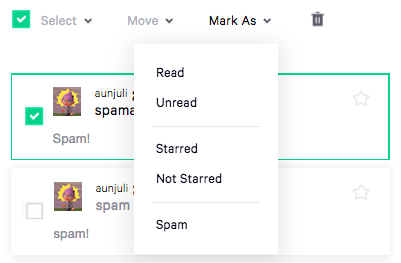
- Click the checkbox of the note you want to flag, and select its associated "Mark As" button.
- Select "Spam."
- This will move the note into an administrative review area and out of your section.
- If you are marking the note because it's abusive or harassing, please report it to the help desk through a ticket after you've marked the note.
Was this article helpful?
